Owner
“Every Monday at 9 AM, send me sales by location in Telegram”
The agent reads the spreadsheets or database itself, builds a chart and sends the report on schedule. No exports, no one in the middle.
- Scheduled tasks
- Telegram
AI agent for your company · on your server
Squid is your company’s workspace on your own server: chats, tasks, documents, spreadsheets and calls, with an AI agent in every one of them. It works with what you already have: Excel, databases, email, Telegram. It reads your spreadsheets, databases, email and chats and does the work from them: the report for Monday’s meeting, a reconciliation, a customer reply, a task for a colleague. Anyone on the team can ask; nobody has to be the data person.
Which clients went quiet after our proposal, and who should we follow up with today?

| Client | Deal | Silent for |
|---|---|---|
| Vector Logistics | $48,500 | 12 days |
| Hale & Sons | $11,200 | 8 days |
| Brightline Homes | $61,000 | 6 days |
Three large deals worth $120,700 need a nudge. I’ve drafted a follow-up for each, picking up on their last questions. Send them from your account?
The agent takes its numbers from your spreadsheets, business systems, email and chats — it doesn’t make them up. Every answer links to its source, so you can open it and check.
Writes emails and documents, edits spreadsheets, builds summaries, assigns tasks to people and runs on a schedule. Anything that can’t be undone waits for your “yes”.
Files, databases and conversations live on your server — not with us and not in someone’s cloud. You can even run it so that nothing leaves the building at all.
Everything is connected
Chat, tasks, calls, documents and databases in Squid are one space, and the agent works in every layer. So the result of one part is immediately the input of the next.
The channel agreed on dates — hand the thread to the agent, and the task with an owner and a due date is already on the board.
After a call the transcript is in the workspace. With one sentence the agent turns it into tasks per participant and a draft email to the client.
A number in a report links to the row in the sheet or the query on the database: open it to check, and in a dashboard it updates by itself.
Tell the agent “remember how this is done” and Mary’s procedure becomes a skill in the company catalog that anyone on the team can use.
See it in action
This is the real Squid screen. We gave the agent an ordinary Excel file with two months of shipments and asked one question, the way you’d ask an analyst.

Your data as it is
A 411-row export from the books. No cleanup, no renaming, no special format.
One question in plain words
“Compare October sales with September by rep and build a dashboard for Monday’s meeting.”
An answer with reasons, not just numbers
The agent found who dropped, checked it against customer debts and warehouse stock, and suggested five concrete steps. Every step it took is visible.
A link for the team
The dashboard opens by link on a phone — no login, nothing to install. Drop it in the team chat before the meeting.
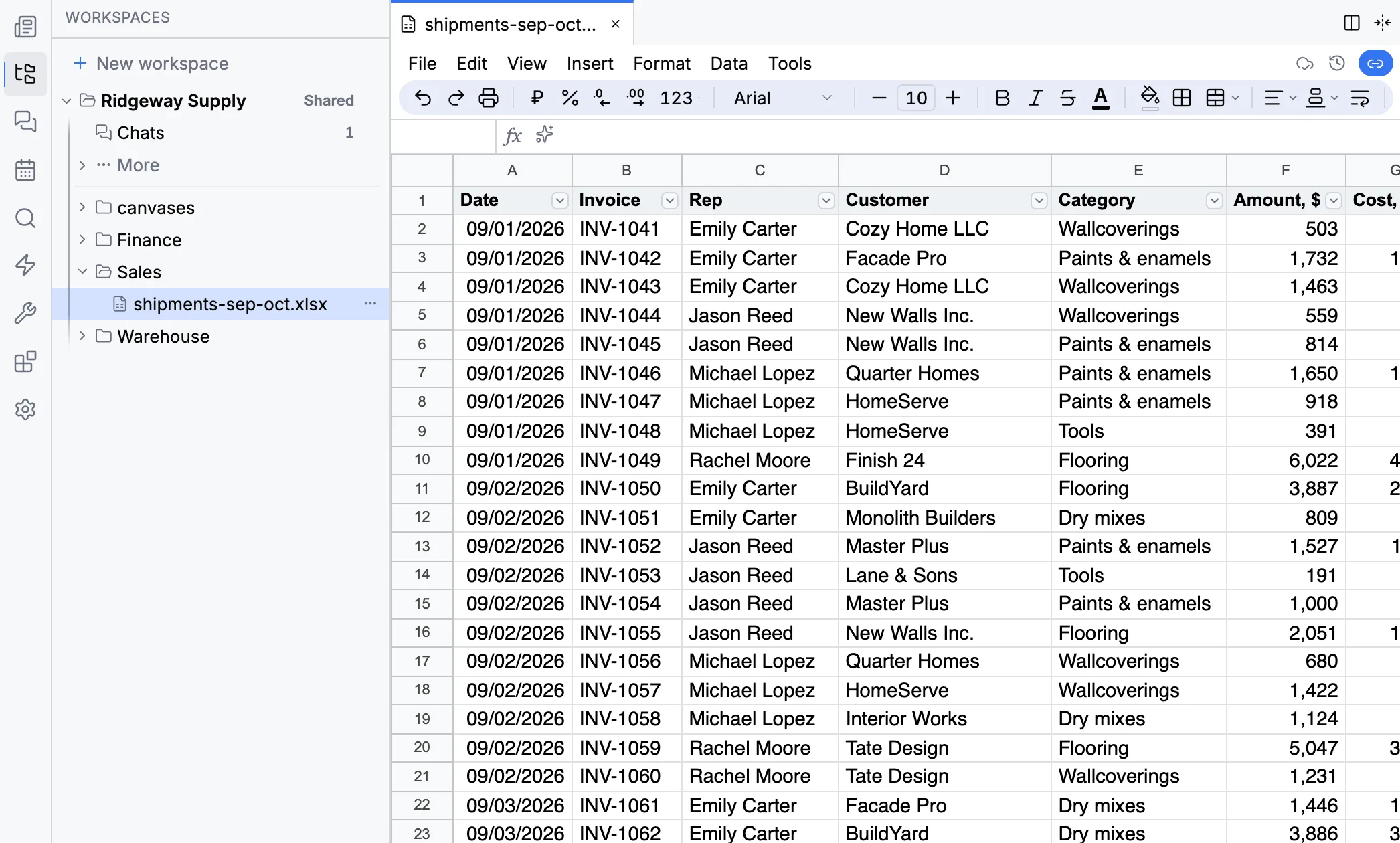
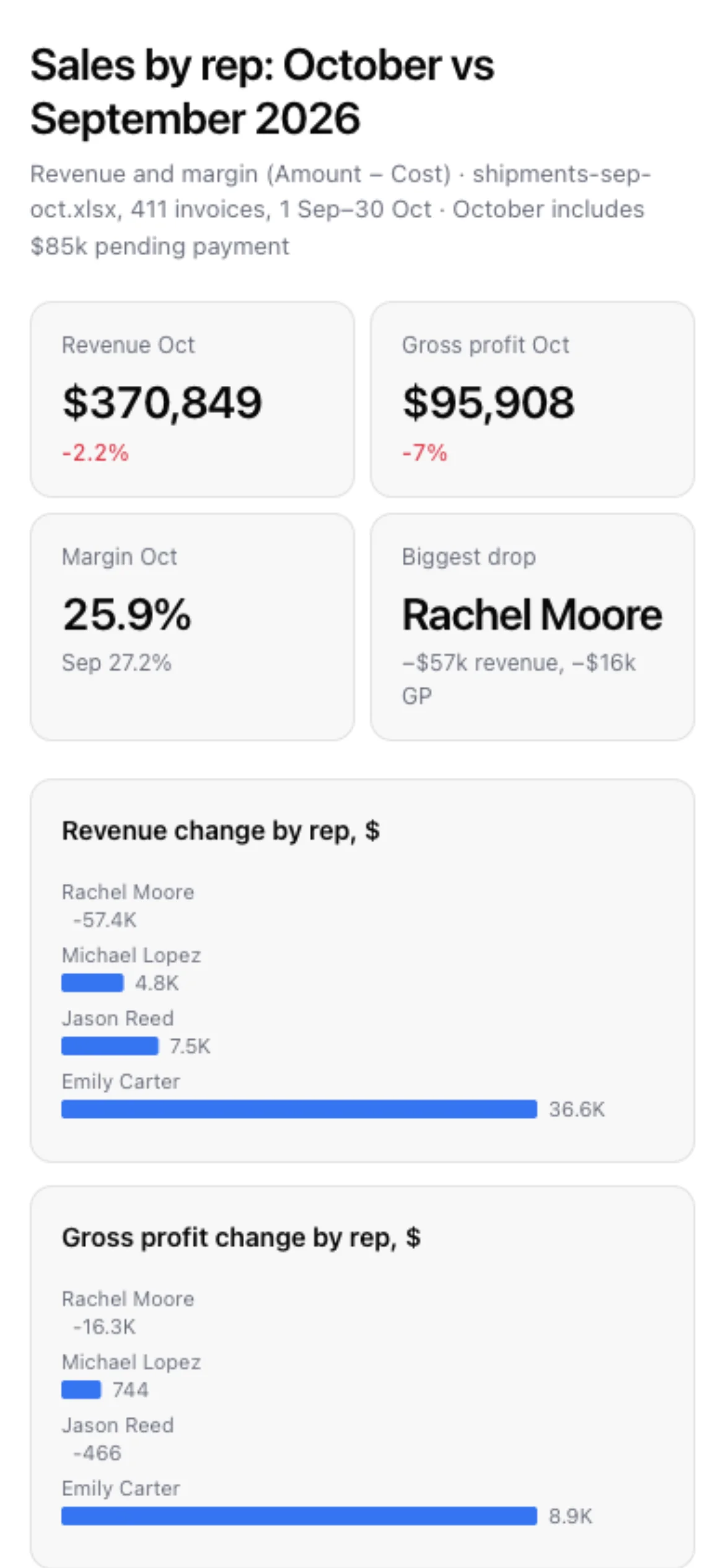
Screenshots of the real interface. Ridgeway Supply and its numbers are made up for the example.
Use cases
Owner
“Every Monday at 9 AM, send me sales by location in Telegram”
The agent reads the spreadsheets or database itself, builds a chart and sends the report on schedule. No exports, no one in the middle.
Finance
“Reconcile the bank statement with this month’s invoices and show the gaps”
Opens the statement and the invoice list, matches payments, highlights mismatches and adds notes right in the spreadsheet.
Salon, clinic, studio
“We need online booking: clients pick the service, the specialist and the time”
A public booking page, staff shifts and double-booking protection. “Arrived”, “no-show” and “done” are visible to the whole team.
Sales
“Find client emails with no reply for over two days and draft responses”
Connects to company email, finds stalled threads and writes replies as drafts. Nothing is sent until you say yes.
Contracts
“Update the contract to the new terms and send it to the partner to sign”
Edits arrive in Word as tracked changes — you decide what to accept. Signing by link without an account, with “viewed” and “signed” in one place.
Data in different places
“Work out profit by category: sales are in one system, purchasing in another”
The agent combines numbers from both systems into one table with a chart. The result opens by link, even on a phone.
For teams
Chats, tasks, documents, spreadsheets, calendar and calls live in one place with one search. The agent is in all of them: bring it into a discussion, hand it a document or put it on a schedule.
Documents and spreadsheets stay ordinary Word and Excel files: open them and send them just like before.
Chats and channels
Threaded discussions, mentions, message translation, “hand to agent”
Tasks and boards
Assignments with due dates and stages — see where things are stuck
Documents
Word and PDF, edited together, with full version history
Spreadsheets
Several people and the agent edit one file at once; every change has an author and a history
Calendar
Synced with Google Calendar, finds a time that works for everyone
Calls
Up to 50 people, screen sharing, transcripts of the conversation
Diagrams
Draw plans and schemes together with colleagues and the agent
Public pages
Summaries, forms and polls that open by link, no login needed
E-signature
Sign by link — no account, no paper, status always visible
Scheduling and booking
Shifts, priced services, online booking for clients
How it differs
Microsoft 365, Salesforce, HubSpot, Notion and the like all ship an AI assistant now. Mostly it writes text and summarises what is already inside that one system. Squid is built differently: it does the work, takes data from every system you have, and you choose the model and the server. It does not replace your accounting, CRM or email: it works on top of them.
| Squid | The AI assistant inside a CRM or office suite | |
|---|---|---|
| What it does | Does the work: writes, edits spreadsheets, assigns tasks, runs on a schedule | Text, summaries and suggestions about what is already in that system |
| Where the data comes from | Your databases, files, email and messengers | Only that system’s own data |
| Accounting, CRM and email | Stay yours: Squid connects to your accounting system, CRM and email and works on top of them | Works only inside its own product; the rest has to be migrated or bought as add-ons |
| Which model | Any: ChatGPT, Claude, Google or a local one on your servers | The one the vendor chose |
| Where it runs | On your server, offline if needed | The vendor’s cloud |
| Control over the AI | The agent has the same rights as the employee; every action and its cost are visible to the admin | The system’s general permissions; logging and cost tracking depend on the vendor |
For example Microsoft 365 Copilot, Salesforce Agentforce, HubSpot Breeze, Notion AI — by their public documentation as of October 2026.
Connections
Nothing to migrate. Connect your business system, email or messenger, and the agent starts answering from them the same day. Your IT person will find familiar names in the list below, and if something is missing, the agent connects it using the service’s own docs.
Models
The admin decides which models each employee can use. Run on a ChatGPT or Claude subscription, an API key, or your own GPUs with Ollama and vLLM.
Security
The agent sees only what the person it works for is allowed to see, checks before anything risky, and every action it takes stays in the log. That is why it can be trusted with the customer base, finances and contracts — the data no company would hand to a cloud chatbot.
The agent has the same rights as the person
It sees only the workspaces, files and databases that the employee it works for has access to.
Secrets are encrypted and hidden from the agent
Database passwords, API keys and tokens are stored encrypted. The agent uses the connection but never sees the secret.
Risky actions need approval
Terminal commands, SSH and file downloads wait for your go-ahead. Permission policies are set per company.
Audit log and cost tracking
Who asked what, what the agent did and what it cost in tokens — all visible to the admin.
Sign in the way you already do
Password, Google, VK, OIDC, OAuth2 or SAML. Roles and groups, workspace rights: read, run, edit, manage.
Backups and one-command rollback
Every update starts with an automatic backup. Copies are encrypted on the machine and sent to the S3 storage of your choice.
App
A browser is enough, but the desktop app is nicer: separate windows, notifications and an unread badge on the icon. It connects to your company’s server and updates along with it.
Apple Silicon · Intel
macOS 12 or later
Windows 10 and 11, 64-bit
Ubuntu 22.04+, Debian and others
Install
Download the file for your system and open it like any other app.
Enter your server
On first launch Squid asks for your company’s server address — the same one you open in the browser.
Get to work
Sign in as usual. Windows and tabs come back where you left them next time.
On a phone, open Squid in the browser and add it to your home screen — you get the same app.
Get started
Tell us in a couple of lines what you do and where your numbers live: spreadsheets, accounting software, email. We’ll prepare a short demo on similar data, and in half an hour you’ll see the report, summary or customer reply the agent builds for your business.
We reply within one business day, and suggest a time for the demo right away
No installation or prep on your side, a couple of sample files is enough, anonymized is fine
No commitment, the demo is free, you decide afterwards